

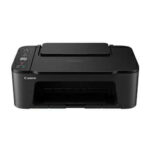
Canon PIXMA MG2540S – Inkjet Photo Printers
UGX225,000.00
Highlights
Canon PIXMA MG2540S – Inkjet Photo Printers Specifications
| Model Numbers | MG2540S |
| Functions | Print, Copy, Scan |
| Print Resolution | Up to 4800¹ x 600 dpi |
| Print Technology | 2 FINE Cartridges (Black and Colour) |
| Mono Print Speed | Approx. 8.0 ipm¹ |
| Colour Print Speed | Approx. 4.0 ipm¹ |
| Borderless Printing | Not available |
| Two Sided Printing | Manual operation |
| Standard Ink Cartridges | PG-445 (Black), CL-446 (Colour) |
| Optional XL Ink Cartridges | PG-445XL (Black), CL-446XL (Colour) |
| Cartridge Yield (Plain paper) | A4 colour documents printing¹ Black: 180 pages Black XL: 400 pages Colour: 180 pages Colour XL: 300 pages |
| Paper Types | Plain Paper, Envelopes, Photo Paper Plus Glossy II (PP-201), Photo Paper Glossy “Everyday Use” (GP-501) |
| Maximum Paper Input | Rear tray: Max. 60 sheets (plain paper) |
| Paper Sizes | Plain paper: A4, A5, B5, Letter, Legal Photo paper: 10x15cm, 13x18cm Envelopes: DL, COM10 |
| Paper Weight | Plain paper: 64 – 105 g/m² Canon photo paper: up to 275 g/m² |
| Scanner Type | CIS flatbed photo and document scanner |
| Scanner Resolution (Optical) | 600 x 1200 dpi¹ |
| A4 Scan Speed | Approx. 14 seconds¹ |
| Scanning Depth (Input / Output) | Colour: 48 bit / 24 bit, Greyscale: 16 bit / 8 bit |
| Maximum Document Size | 216 x 297 mm |
| Copy Speed | Approx. 31 seconds |
| Multiple Copy | 21 copies (max) |
| Copy Functions | Document copying (plain paper) |
| Interface Type – PC / Mac | Hi-Speed USB (B Port) |
| Supported Operating Systems | Windows 10, Windows 8.1, Windows 8, Windows 7, Windows Vista, Windows XP, Mac OS X v10.7.5 to Mac OS X v10.11 |
| Minimum System Requirements | Windows: 3.1GB disk space, Internet Explorer 8; Mac: Internet connection, 1.5GB disk space, Safari 5; Display: 1024 x 768 XGA |
| Software Included | MP Driver including Scanning Utility, My Image Garden with Full HD Movie Print¹, Quick Menu, Easy-WebPrint EX (download)² |
| Weight | Approx. 3.5 kg |
| Dimensions (W x D x H) | 426 x 306 x 145mm |
| Operating Temperature | 5-35°C |
| Operating Humidity | 10-90%RH (no dew condensation) |
| Power Source | AC 100-240V, 50/60Hz |
| Power Consumption | Off: Approx. 0.4 W Standby (connected to PC via USB): Approx. 1.0 W (scanning lamp off) Standby (all ports connected): Approx. 1.0 W (scanning lamp off) Time to enter Standby mode: 7 minutes Copying: Approx. 9 W¹ |
22 people are viewing this right now

Guaranteed safe & secure checkout

Free Delivery
Free delivery on orders above USh. 300,000

1 Year Warranty
All products come with manufacturer’s warranty

Always Authentic
We only sell 100% authentic products

New Products Only
No used or refurbished products

ISO 9001-2015 CERTIFIED
We fully understand our clients’ demands
Description
About the brand
Reviews (0)
Description
Experience seamless printing, scanning, and copying at home with the Canon PIXMA MG2540S Inkjet Photo Printer. Compact and budget-friendly, this all-in-one printer caters to your everyday needs with ease. With its sleek design and versatile functionality, it’s the perfect addition to any home office setup. Get the best price on the Canon PIXMA MG2540S at the top computer store in Kampala.

Canon
Related products
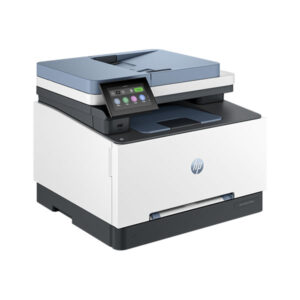
HP Color LaserJet Pro MFP 3303fdw
Original price was: UGX2,500,000.00.UGX2,300,000.00Current price is: UGX2,300,000.00.


Epson EcoTank L3250 Printer
Original price was: UGX790,000.00.UGX750,000.00Current price is: UGX750,000.00.





Rating & Review
There are no reviews yet.